SMS Text Messaging Policy
Last updated: June 16, 2026
About this program
StarBound offers an optional SMS text messaging notification program for parents and guardians of enrolled students. The program is operated by StarBound and delivers notifications about a parent’s linked student’s activity on the StarBound learning platform.
Who can opt in
Only parents and guardians with an active StarBound account linked to a student can opt in to SMS notifications. Students do not receive SMS messages from StarBound.
How parents opt in
- Sign in to a StarBound parent account at starboundedu.com
- Go to Settings → Notifications
- Choose Text or All as the delivery method
- Enter a US mobile phone number
- Read the consent language and toggle on the SMS Text Notifications control (off by default)
- Click Save Settings
The SMS Text Notifications toggle is off by default. Parents must actively turn it on after reading the consent language — SMS consent is never granted automatically and is never bundled with acceptance of our Terms of Service or Privacy Policy.
Consent language shown to parents
At the moment of opt-in, parents are shown the following language next to the SMS Text Notifications toggle:
By enabling this, I agree to receive recurring SMS text messages from StarBound at the number above when my child receives a behavior mark or a behavior flag. Message frequency varies. Message and data rates may apply. Reply STOP to any message to unsubscribe, or HELP for help. Consent is not required to use StarBound.
What messages are sent
- Behavior marks posted by teachers
- Behavior flags triggered by accumulated marks
These are the only texts StarBound sends. Other StarBound activity (positive points, badges, reward redemptions, weekly summaries) is available in email and in-app notifications, which parents can enable or disable separately — it is not sent by SMS.
Message frequency
Message frequency varies with the student’s activity. Most parents receive a handful of messages per week.
Charges
StarBound does not charge parents for SMS messages. Your mobile carrier’s standard message and data rates may apply.
How to unsubscribe (STOP)
Reply STOP to any SMS message from StarBound at any time. You will receive a confirmation message, and no further SMS messages will be sent to that number. Parents can also turn off SMS Text Notifications in their StarBound parent settings at any time.
How to get help (HELP)
Reply HELP to any SMS message from StarBound for assistance, or email support@starboundedu.com.
Consent is optional
SMS opt-in is entirely optional. Parents can use every feature of StarBound without enabling SMS notifications.
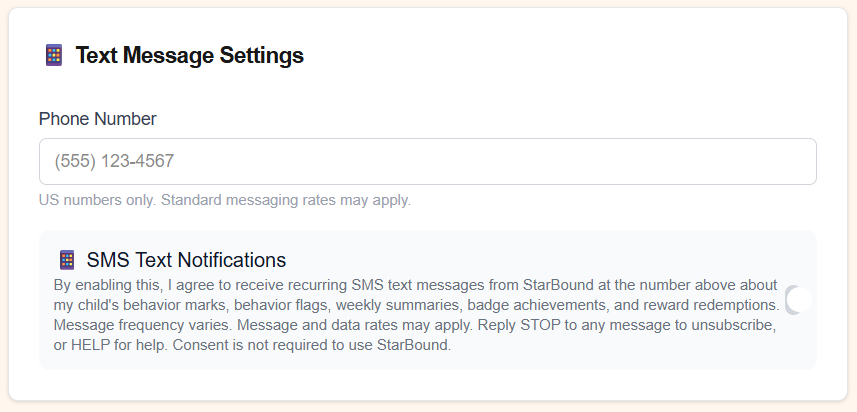
The opt-in screen
Below is the actual opt-in screen shown to parents in the StarBound parent dashboard:
Privacy and terms
For more on how StarBound handles parent contact information, see our Privacy Policy and Terms of Service.
Contact
Questions about the SMS program? support@starboundedu.com